


Como ocultar pagamento na entrega (COD) para produtos específicos

Table of Contents
Follow this tutorial to hide Cash on Delivery (COD) in Shopify for specific products where you don't want it available. With Releasit COD Fee & Partial Pay, you can disable COD on individual products in just a few clicks.
Want to disable COD on specific products?
Install Releasit COD Fee & Partial Pay to control which products support Cash on Delivery in your Shopify store — no coding required.
Install Releasit COD Fee & Partial PayStep 1: Install Releasit COD Fee & Partial Pay from the Shopify App Store
Head to the Shopify App Store and install Releasit COD Fee & Partial Pay. Once installed, open the app from your Shopify admin.

Step 2: Go to the "Limit COD" Page
Inside the app, navigate to the Limit COD page from the main menu.
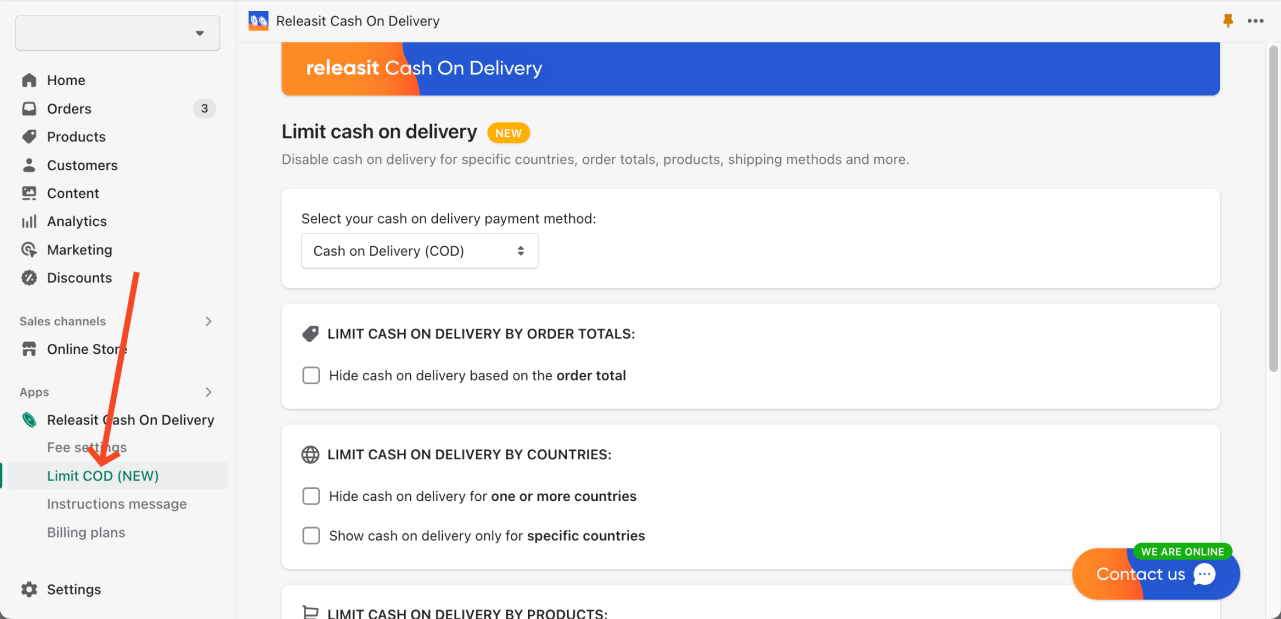
Step 3: Enable "Hide Cash on Delivery for One or More Products"
Toggle on the option "Hide cash on delivery for one or more products".

Step 4: Select the Products Where You Want to Disable Cash on Delivery
Use the product selector that appears to search for and add the specific products you want to exclude from COD. You can add as many products as needed.

Step 5: Done!
Cash on Delivery will now be disabled for your selected products in your Shopify store. Customers who add those products to their cart will not see COD as a payment option at checkout.
If you need help or have any questions, don't hesitate to contact us directly from the app!
Take full control of your COD settings
Releasit COD Fee & Partial Pay lets you hide or restrict Cash on Delivery by product, country, shipping method, and more. Install it free today.
Install Releasit COD Fee & Partial PayRelated Reading
- How to Show Cash on Delivery Only for Local Pickup Orders in Shopify - restrict COD to in-store or local pickup customers only.
- How to Show Cash on Delivery Only for Specific Countries in Shopify - enable COD only in the markets where it makes sense for your business.
- How to Reduce COD Costs on Your Shopify Store in 2025 - protect your margins and keep COD profitable as you scale.
Frequently Asked Questions
Can I hide COD for specific product variants rather than entire products?
The product-level restriction applies to the product as a whole. If you need more granular control at the variant level, contact us from within the app and our support team can advise on the best approach for your setup.
Will hiding COD on one product affect other products in the same collection?
No. The restriction is applied only to the specific products you select. All other products in the same collection will continue to offer COD at checkout as normal.
Can customers still check out if COD is hidden for a product in their cart?
Yes. Hiding COD for a product simply removes it as a payment option for that cart. Customers can still complete their purchase using any other available payment methods in your store.
Is there a limit to how many products I can restrict from COD?
No. You can select as many products as you need. The setting supports restricting COD across your entire catalog if required.


