


Hoe alleen contant betalen (COD) weergeven voor lokale ophaling

Table of Contents
Follow this tutorial to show Cash on Delivery (COD) in Shopify only for local pickup orders. With Releasit COD Fee & Partial Pay, the whole setup takes under two minutes.
Need to restrict COD to local pickup only?
Install Releasit COD Fee & Partial Pay to control exactly when and where Cash on Delivery appears in your Shopify store.
Install Releasit COD Fee & Partial PayStep 1: Install Releasit COD Fee & Partial Pay from the Shopify App Store
Head to the Shopify App Store and install Releasit COD Fee & Partial Pay. Once installed, open the app from your Shopify admin.

Step 2: Go to the "Limit COD" Page
Inside the app, navigate to the Limit COD page from the main menu.
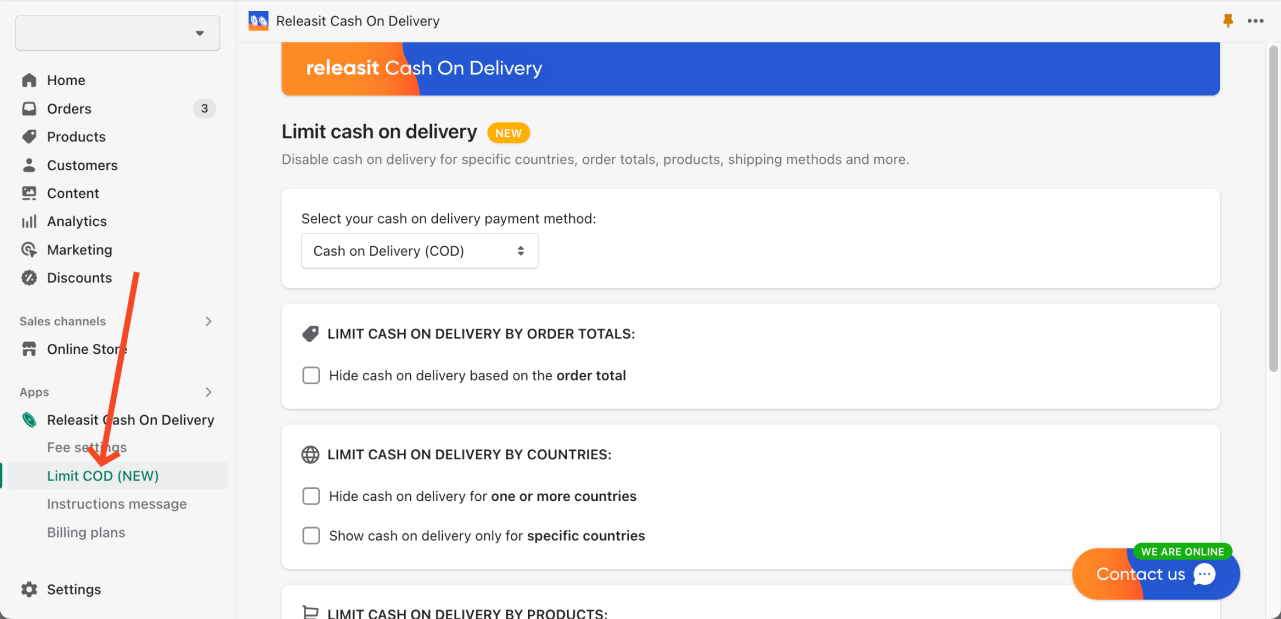
Step 3: Enable "Show Cash on Delivery Only for Local Pickup Orders"
Toggle on the option "Show cash on delivery only for local pickup orders".

Step 4: Done!
Cash on Delivery will now only be visible for local pickup orders in your Shopify store. Customers choosing standard delivery will not see the COD option at checkout.
If you need help or have any questions, don't hesitate to contact us directly from the app!
Take full control of your COD settings
Releasit COD Fee & Partial Pay lets you limit Cash on Delivery by shipping method, country, product, and more. Install it free and configure it in minutes.
Install Releasit COD Fee & Partial PayRelated Reading
- How to Hide Cash on Delivery for Specific Products in Shopify - disable COD on individual products while keeping it available for the rest of your store.
- How to Show Cash on Delivery Only for Specific Countries in Shopify - restrict COD to the markets where it makes sense for your business.
- How to Reduce COD Costs on Your Shopify Store in 2025 - practical strategies to protect your margins and lower the operational costs of running COD.
Frequently Asked Questions
Can I use COD for local pickup and regular shipping at the same time?
No. When this setting is enabled, COD will only appear for local pickup orders. Customers who select any shipping method will not see Cash on Delivery as a payment option at checkout.
What happens if a customer switches from local pickup to delivery after seeing COD?
The COD option will be hidden automatically as soon as the customer changes their shipping selection to a delivery method. Only local pickup orders will display it.
Does this setting apply to the Releasit COD Fee & Partial Pay app only, or does it affect other apps?
This setting is managed entirely within Releasit COD Fee & Partial Pay and controls the visibility of the COD payment method that the app manages. It does not affect other payment apps or native Shopify COD settings independently of the app.
Do I need to configure anything else after enabling this setting?
No. Once you toggle the option on in the Limit COD page, the restriction is active immediately. No additional configuration is required.


