


Jak zobrazit dobírku (COD) pouze pro konkrétní země

Table of Contents
Follow this tutorial to show Cash on Delivery (COD) in Shopify only for the countries you want. With Releasit COD Fee & Partial Pay, you can limit COD to specific markets in just a few steps.
Want to enable COD only in specific countries?
Install Releasit COD Fee & Partial Pay to control exactly which markets see Cash on Delivery at checkout in your Shopify store.
Install Releasit COD Fee & Partial PayStep 1: Install Releasit COD Fee & Partial Pay from the Shopify App Store
Head to the Shopify App Store and install Releasit COD Fee & Partial Pay. Once installed, open the app from your Shopify admin.

Step 2: Go to the "Limit COD" Page
Inside the app, navigate to the Limit COD page from the main menu.
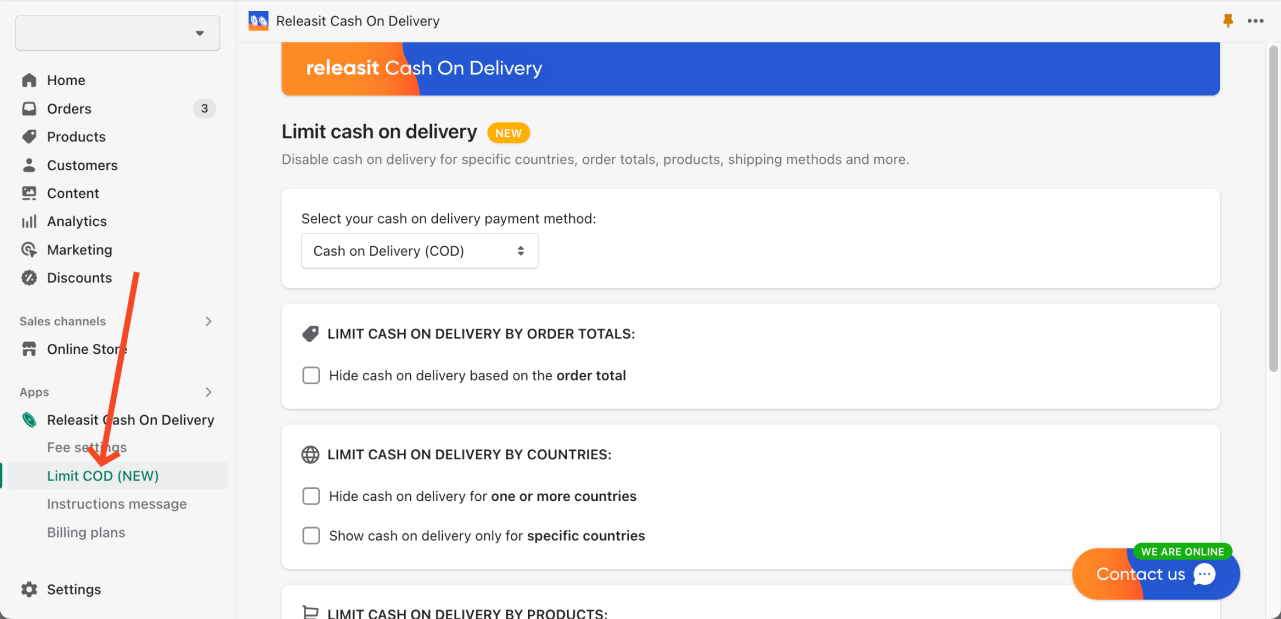
Step 3: Enable "Show Cash on Delivery Only for Specific Countries"
Toggle on the option "Show cash on delivery only for specific countries".

Step 4: Select the Countries Where You Want to Enable Cash on Delivery
Use the country selector to search for and add each country where you want COD to be available. Click "Add country" to confirm each selection. You can add as many countries as you need.

Step 5: Done!
Cash on Delivery will now only be visible to customers in your selected countries. Shoppers checking out from any country not on your list will not see the COD payment option.
If you need help or have any questions, don't hesitate to contact us directly from the app!
Control COD availability across every market you serve
Releasit COD Fee & Partial Pay lets you restrict Cash on Delivery by country, product, shipping method, and more. Install it free and configure it in minutes.
Install Releasit COD Fee & Partial PayRelated Reading
- How to Show Cash on Delivery Only for Local Pickup Orders in Shopify - restrict COD to in-store or local pickup customers only.
- How to Hide Cash on Delivery for Specific Products in Shopify - disable COD on individual products while keeping it available for the rest of your catalog.
- How to Start a Successful COD Dropshipping Business in 2025 - the complete beginner's guide to launching and scaling a Cash on Delivery dropshipping store.
Frequently Asked Questions
Can I enable COD for multiple countries at the same time?
Yes. You can add as many countries as you need using the country selector. There is no limit on how many countries you can include in your COD availability list.
What happens if a customer's country is not on my list?
Customers from countries not included in your list will not see Cash on Delivery as a payment option at checkout. They can still complete their purchase using any other payment methods available in your store.
Can I hide COD for certain countries instead of only showing it for specific ones?
Yes. Releasit COD Fee & Partial Pay includes both approaches. You can either whitelist specific countries (show COD only there) or blacklist specific countries (hide COD only there), depending on which is more practical for your market setup.
Will this setting work for customers using a VPN or hiding their location?
Country detection is based on the shipping address the customer enters at checkout, not their IP address. If a customer enters a shipping address in a country that is not on your list, COD will not be shown, regardless of where they are physically located.


